If you have hot water but the radiators are not heating, the central heating may be switched off at the boiler, timer, programmer or room thermostat.
Gas-boiler controls vary between properties. Some boilers have controls built into the front panel, while others use a separate mechanical timer, digital programmer, wireless thermostat or wall-mounted controller.
Tenants should complete the safe external checks below before reporting that the heating is not working. Do not remove the boiler cover or attempt any gas, electrical or internal repair.
Important Gas Safety Notice
```- Do not remove the boiler casing.
- Do not touch gas valves, wiring or internal boiler components.
- Only operate the external controls, timer, thermostat and normal user settings.
- If you smell gas, do not continue troubleshooting.
- Open doors and windows where safe, avoid electrical switches and naked flames, leave the property and call the National Gas Emergency Service on 0800 111 999.
- If a carbon monoxide alarm sounds, leave the property and treat it as an emergency.
- If the boiler is leaking, sparking, overheating or producing a burning smell, switch it off where safe and report it immediately.
Step 1: Check That the Boiler Has Power
Check the boiler display or indicator lights. If the display is completely blank, check:
- The boiler wall switch or fused spur
- The nearby plug socket, where applicable
- The fuse box or consumer unit
- Whether the pre-payment meter has credit, where applicable
If the boiler or heating circuit trips the fuse box again after being reset once, do not keep resetting it. Open a maintenance task.
Step 2: Select Heating and Hot Water Mode
Some boilers have a selector control allowing you to choose between:
- Off
- Hot water only or summer mode
- Heating and hot water or winter mode
- Reset
To use the radiators, make sure the boiler is set to the heating-and-hot-water or winter position rather than hot-water-only mode.
The exact symbols vary by model. Common examples include:
- A tap symbol for hot water only
- A radiator symbol for central heating
- A tap and radiator together for heating and hot water
- A snowflake or winter symbol for heating mode
Step 3: Check the Room Thermostat
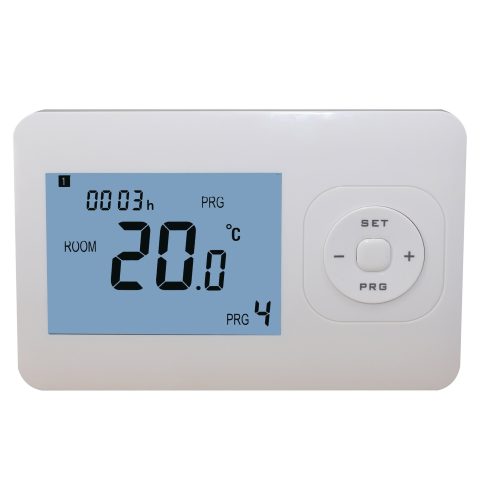
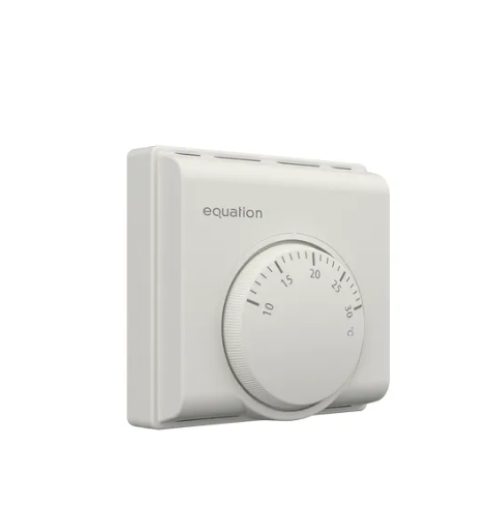
The boiler will not normally provide central heating unless the room thermostat is requesting heat.
- Locate the room thermostat, usually in a hallway, living room or central area.
- Check that it is switched on.
- Set the temperature above the current room temperature.
- For testing, temporarily raise it to approximately 22–25°C.
- Wait a few minutes to see whether the boiler starts and the radiators begin warming.
If the thermostat uses batteries and the display is blank or showing a low-battery symbol, replace the batteries with the type specified by the manufacturer.
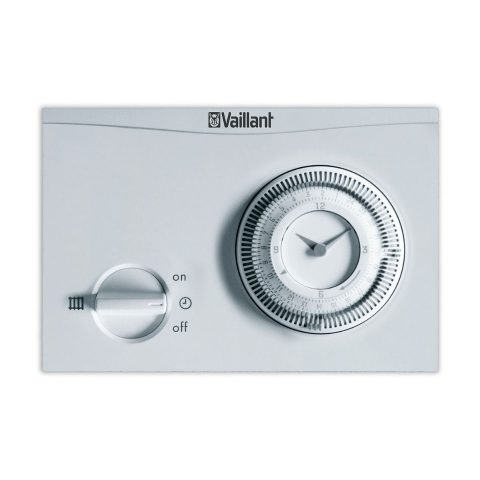
Step 4: Check the Mechanical Timer
Some heating systems use a round 24-hour mechanical timer with small pins, tabs or segments around the edge.
Each segment normally represents a short period, commonly 15 or 30 minutes. However, the position used for “on” and “off” varies between timer models.
Do not assume that pushed-in pins always mean “on”. Check:
- The printed markings on the timer
- The diagram beside the dial
- The make and model of the timer
- The manufacturer’s manual
Set the correct current time
Rotate the timer dial only in the direction shown by the arrow until the current time aligns with the marker.
Make sure you distinguish between morning and evening on a 24-hour clock.
Set the required heating periods
Move the appropriate pins or segments into the position marked as heating “on” for the periods when heating is required.
For example, you may choose:
- Morning heating before occupants wake up
- Evening heating when occupants return home
- Heating off during long periods when the property is unoccupied
Select timed operation
Mechanical timers often have a small selector with settings similar to:
- 0 or Off: heating disabled
- Clock symbol or Auto: heating follows the programmed times
- I, On or Continuous: heating is available outside the programmed schedule
The wording and symbols vary, so follow the markings on the installed timer.
Step 5: Use Manual or Continuous Mode for Testing
If you are unsure whether the timer schedule is correct, temporarily select manual, continuous or “on” mode.
This bypasses the programmed times, but the room thermostat should still control whether the boiler fires.
To test:
- Select manual or continuous heating mode.
- Turn the room thermostat above the current room temperature.
- Wait several minutes.
- Check whether the boiler displays a heating or flame symbol.
- Check whether the radiators begin to warm.
After testing, return the controller to timed or automatic mode if that is your normal setting.
Step 6: Check a Digital Programmer or Smart Controller
Digital controllers may offer settings such as:
- Off
- Auto or scheduled
- Manual
- Advance
- Boost
- Holiday or away mode
- Different schedules for weekdays and weekends
Check that the controller is not set to off, holiday or frost-protection-only mode.
To operate the controller correctly:
- Find the manufacturer and model number.
- Search online for the exact user manual.
- Follow only the instructions for that model.
- Take a photo of the original settings before making changes.
Step 7: Check the Radiator Valves
If the boiler appears to be running but a radiator remains cold, check the thermostatic radiator valve.
- Turn the valve above its frost or minimum setting.
- For testing, select a medium or higher number.
- Make sure furniture, curtains or belongings are not obstructing the radiator.
Do not remove the valve head or attempt to repair the valve.
Step 8: Check the Boiler Pressure
Many sealed heating systems will not operate correctly if the boiler pressure is too low.
When the system is cold, the pressure is commonly expected to be around 1 to 1.5 bar, although the correct range depends on the boiler.
If the pressure is below 1 bar, follow the property-specific boiler-pressure guide or open a maintenance task if you are unsure how to top it up.
Step 9: Reset the Boiler Once if Required
If the boiler displays a fault or lockout symbol, follow the external reset instructions printed on the boiler or in its manual.
Reset the boiler once only. If the fault returns, do not repeatedly reset it.
Allow Time for the Heating to Respond
The boiler and radiators may not become hot immediately. Allow several minutes after changing the controls.
Larger or colder heating systems may take longer before every radiator feels warm.
When to Open a Maintenance Task
Please report the issue if:
- The boiler has no power
- The boiler displays a fault code
- The boiler pressure is too low and cannot be safely restored
- The timer or thermostat is blank or not responding
- The heating does not start in manual or continuous mode
- The boiler starts but all radiators remain cold
- The heating repeatedly switches off unexpectedly
- The boiler is leaking or making unusual noises
- The thermostat or timer is damaged
- You have no heating during cold weather
Photos and Information Required
When opening the maintenance task, please provide:
- A clear photo of the complete boiler
- A photo of the boiler control-panel settings
- A photo of the boiler display and any fault code
- A photo of the pressure gauge
- A photo of the mechanical timer or digital programmer
- A photo of the room thermostat and its current setting
- The boiler make and model
- The thermostat or controller make and model
- Confirmation that heating-and-hot-water mode was selected
- Confirmation that the thermostat was raised above room temperature
- Confirmation that manual or continuous mode was tested
- Confirmation of whether the boiler fired and whether any radiators became warm
- Confirmation of whether hot water is working normally
Providing complete information helps us determine whether the problem relates to the boiler, pressure, thermostat, timer, programmer or heating system.
Possible Contractor Charges
If an engineer attends and the heating system is working correctly but had been switched off, left in hot-water-only mode, programmed incorrectly or set below the room temperature at the thermostat, the call-out charge may be recharged to the tenant.
If the problem is caused by a defective boiler, timer, thermostat, pump, valve, wiring fault or another issue not caused by tenant use, the landlord will normally be responsible for arranging the repair.
Heating and gas-safety concerns should always be reported promptly. Do not delay reporting a dangerous or urgent fault because of concern about a possible charge.
Official Guidance
Boiler and controller instructions differ by manufacturer and model. Consult the exact user manual provided with the appliance or the manufacturer’s official online literature before changing unfamiliar settings.
Baxi user guides
Worcester Bosch literature
National Gas emergency contact information